引用出處
正文開始
目前有各種各樣的技術來將新應用部署到生產環境,
所以權衡對系統和終端使用者的影響降至最少,選擇正確的方式是非常重要的。
本文將著重討論如下部署策略:
- 重建部署:版本 A 下線後版本 B 上線
- 滾動部署(滾動更新或者增量釋出):版本 B 緩慢更新並替代版本 A
- 藍綠部署:版本 B 並行與版本 A 釋出,然後流量切換到版本 B
- 金絲雀部署:版本 B 向一部分使用者釋出,然後完全放開
- A/B 部署布:版本 B 只向特定條件的使用者釋出
- 影子部署:版本 B 接受真實的流量請求,但是不產生響應
我們來看一下每個策略最適合哪種使用者使用場景。
爲了簡化,我們使用 Kubernetes ,並用 Minikube 進行例子演示。
每個策略的配置例子和詳細步驟都可以在這個 git 倉庫 上找到。
重建部署
重建策略是一個冗餘的方式,它包含下線版本 A,然後部署版本 B。
這個方式意味著服務的宕機時間依賴於應用下線和啟動耗時。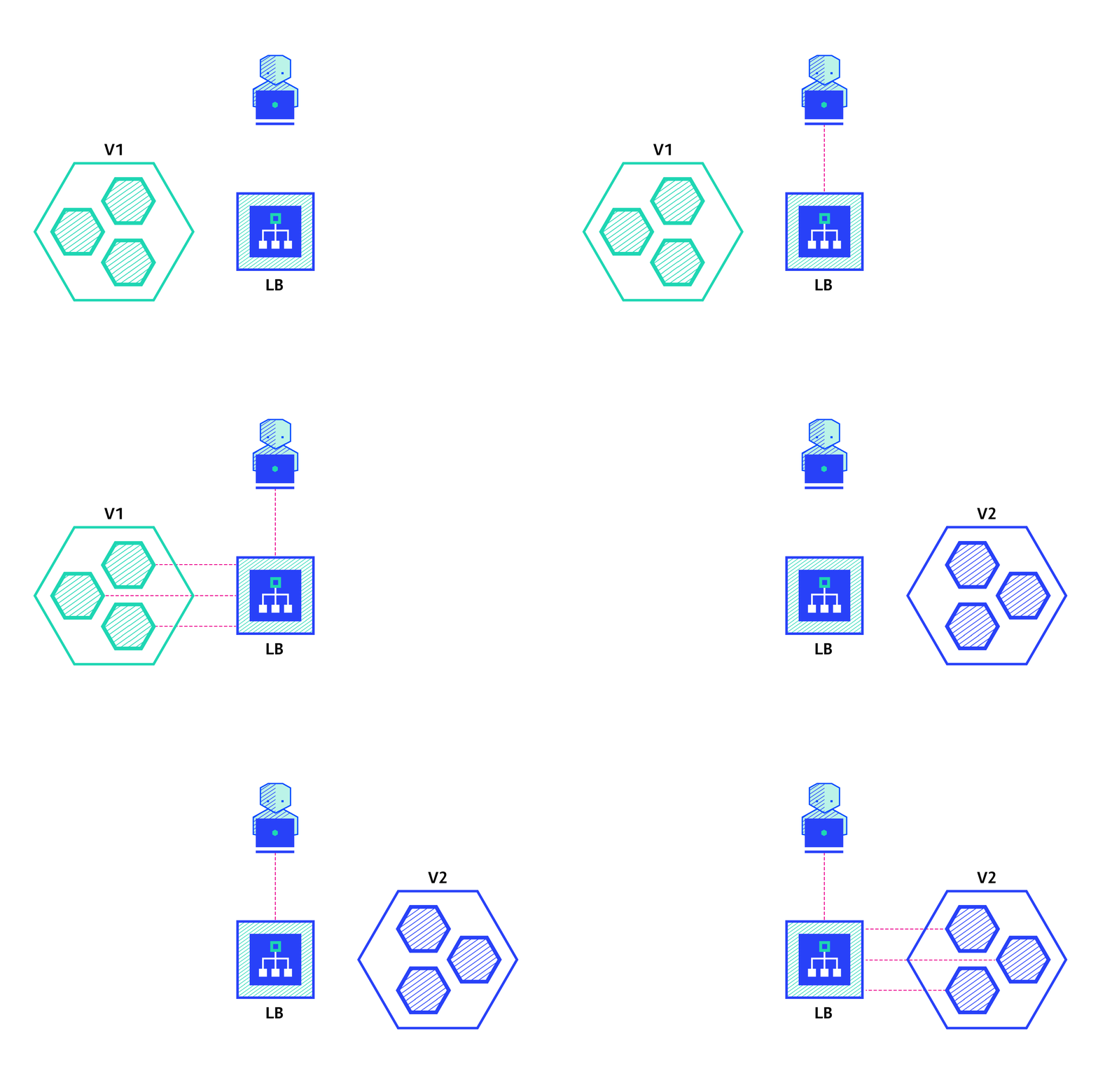
優點:
- 便於設定
- 應用狀態完整更新
缺點:
- 對使用者影響很大,預期的宕機時間取決於下線時間和應用啟動耗時
滾動部署
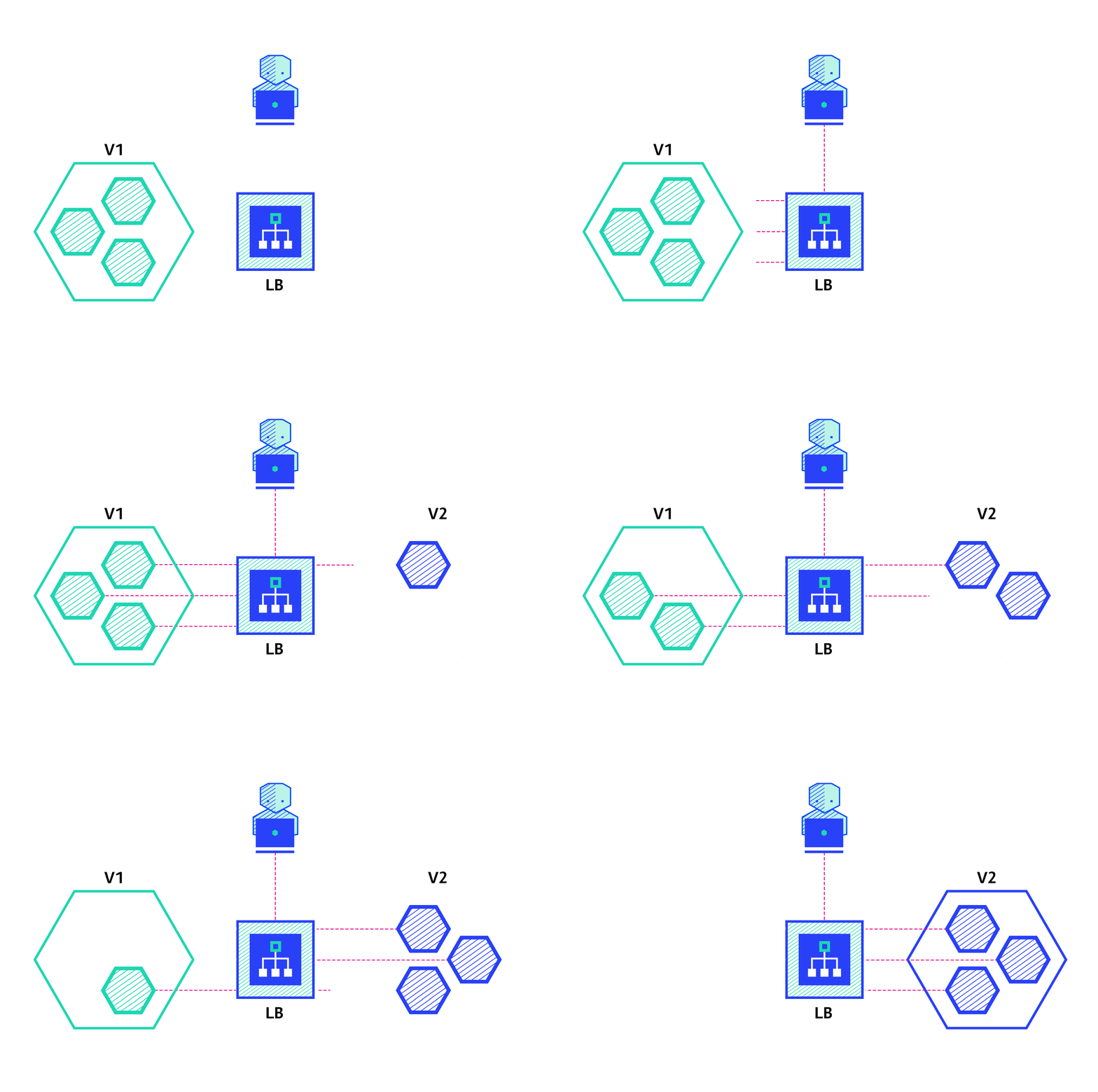
滾動部署策略是指通過逐個替換應用的所有例項,
來緩慢釋出應用的一個新版本。
通常過程如下:
在負載排程後有個版本 A 的應用例項池,
一個版本 B 的例項部署成功,可以響應請求時,
該例項被加入到池中。
然後版本 A 的一個例項從池中刪除並下線。
考慮到滾動部署依賴於系統,
可以調整如下引數來增加部署時間:
- 並行數,最大批量執行數:同時釋出例項的數目
- 最大峰值:考慮到當前例項數,例項可以加入的數目
- 最大不可用數:在滾動更新過程中不可用的例項數
優點:
- 便於設定
- 版本在例項間緩慢釋出
- 對於能夠處理資料重平衡的有狀態應用非常方便
缺點:
- 釋出/回滾耗時
- 支援多個 API 很困難
- 無法控制流量
藍綠部署
藍綠部署策略與滾動部署不同,
版本 B(綠)同等數量的被並排部署在版本 A(藍)旁邊。
當新版本滿足上線條件的測試後,
流量在負載均衡層從版本 A 切換到版本 B。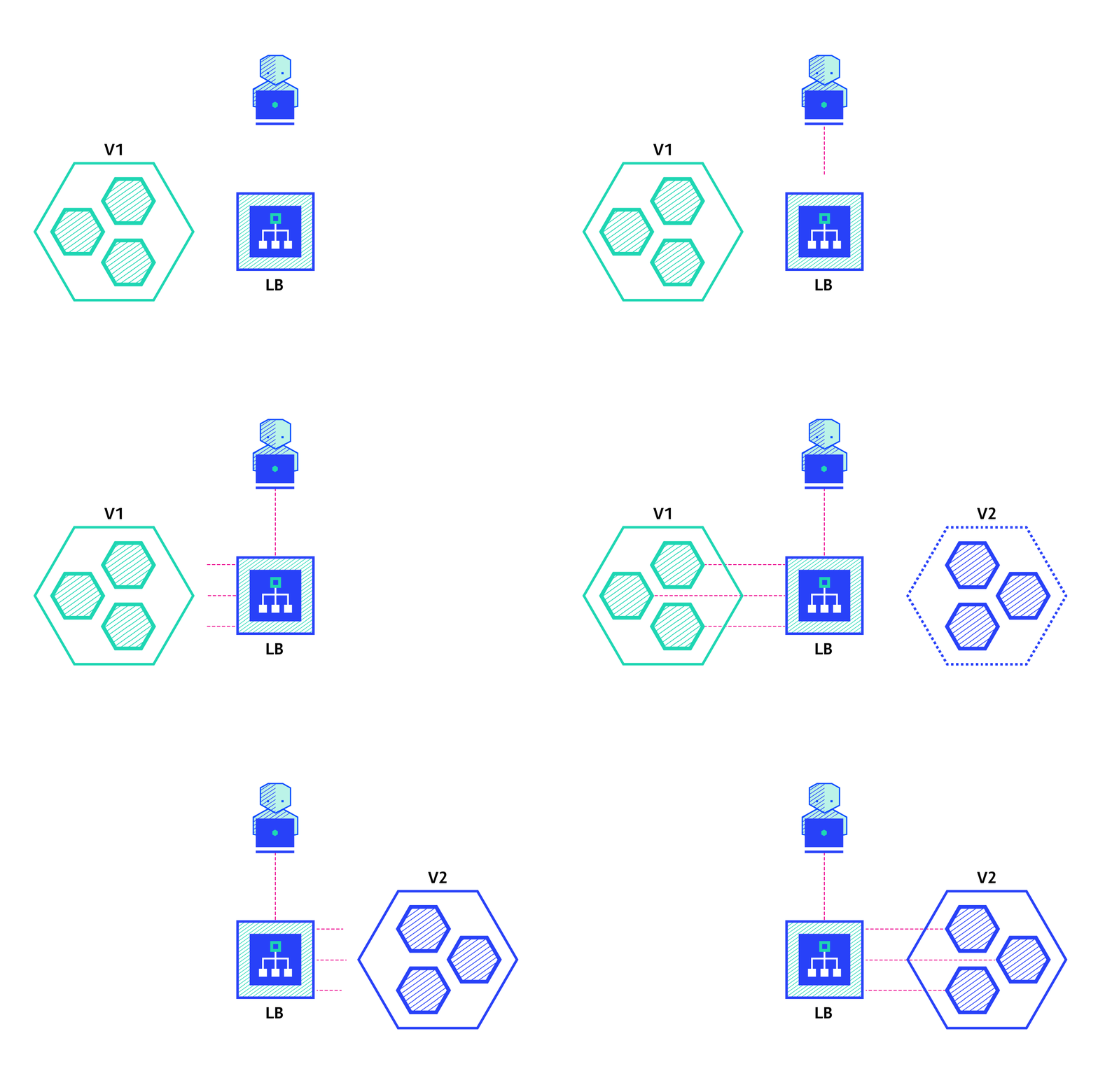
優點:
- 實時釋出、回滾
- 避免版本衝突問題,整個應用狀態統一一次切換
缺點:
- 比較昂貴因為需要雙倍的資源
- 在釋放版本到生產環境之前,整個平臺的主流程測試必須執行
- 處理有狀態的應用很棘手
金絲雀部署
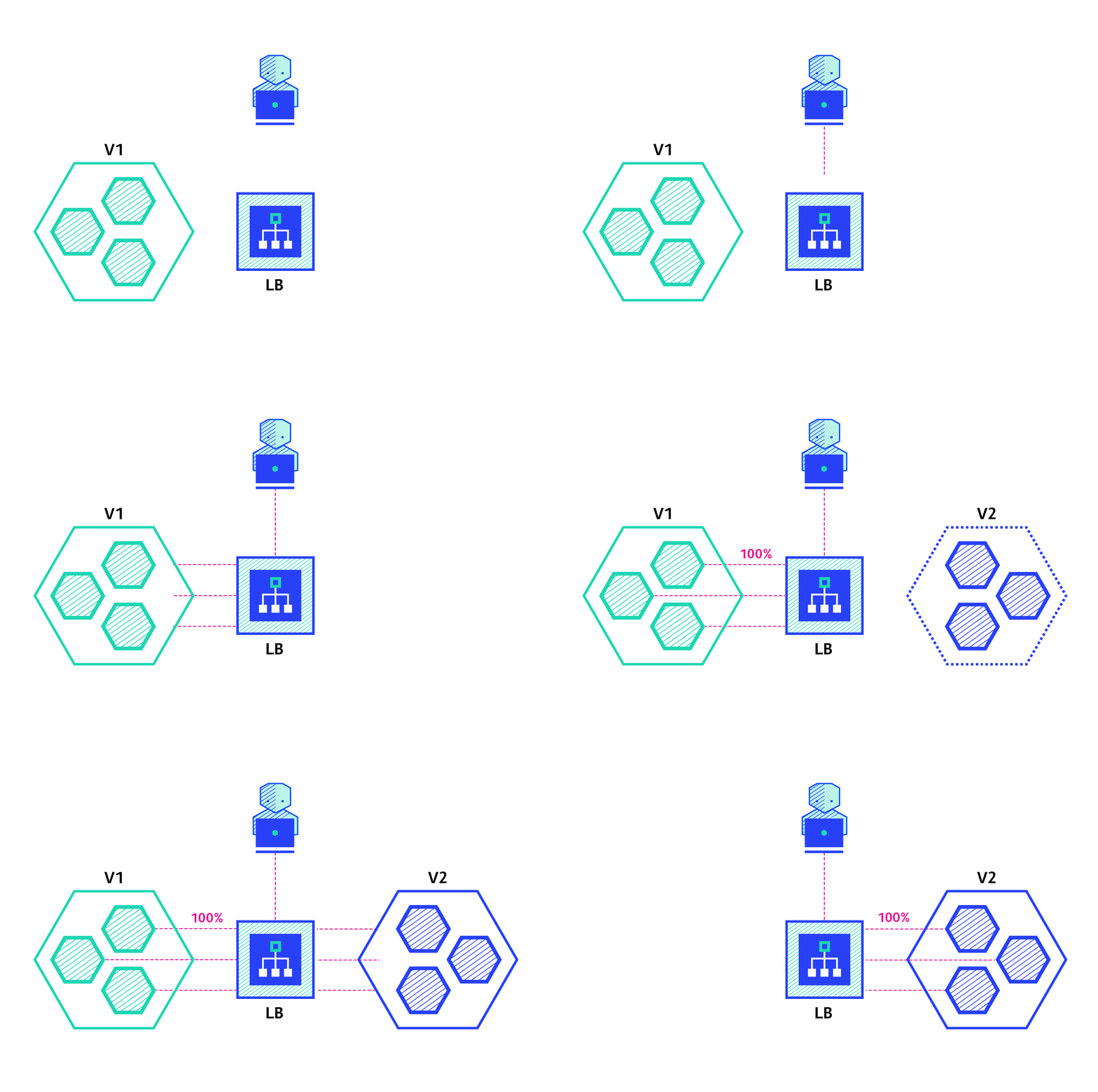
金絲雀部署是指逐漸將生產環境流量從版本 A 切換到版本 B。
通常流量是按比例分配的。
例如 90%的請求流向版本 A,10%的流向版本 B。
這個技術大多數用於缺少足夠測試,或者缺少可靠測試,
或者對新版本的穩定性缺乏信心的情況下。
優點:
- 版本面向一部分使用者釋出
- 方便錯誤評估和效能監控
- 快速回滾
缺點:
- 釋出緩慢
A/B 測試
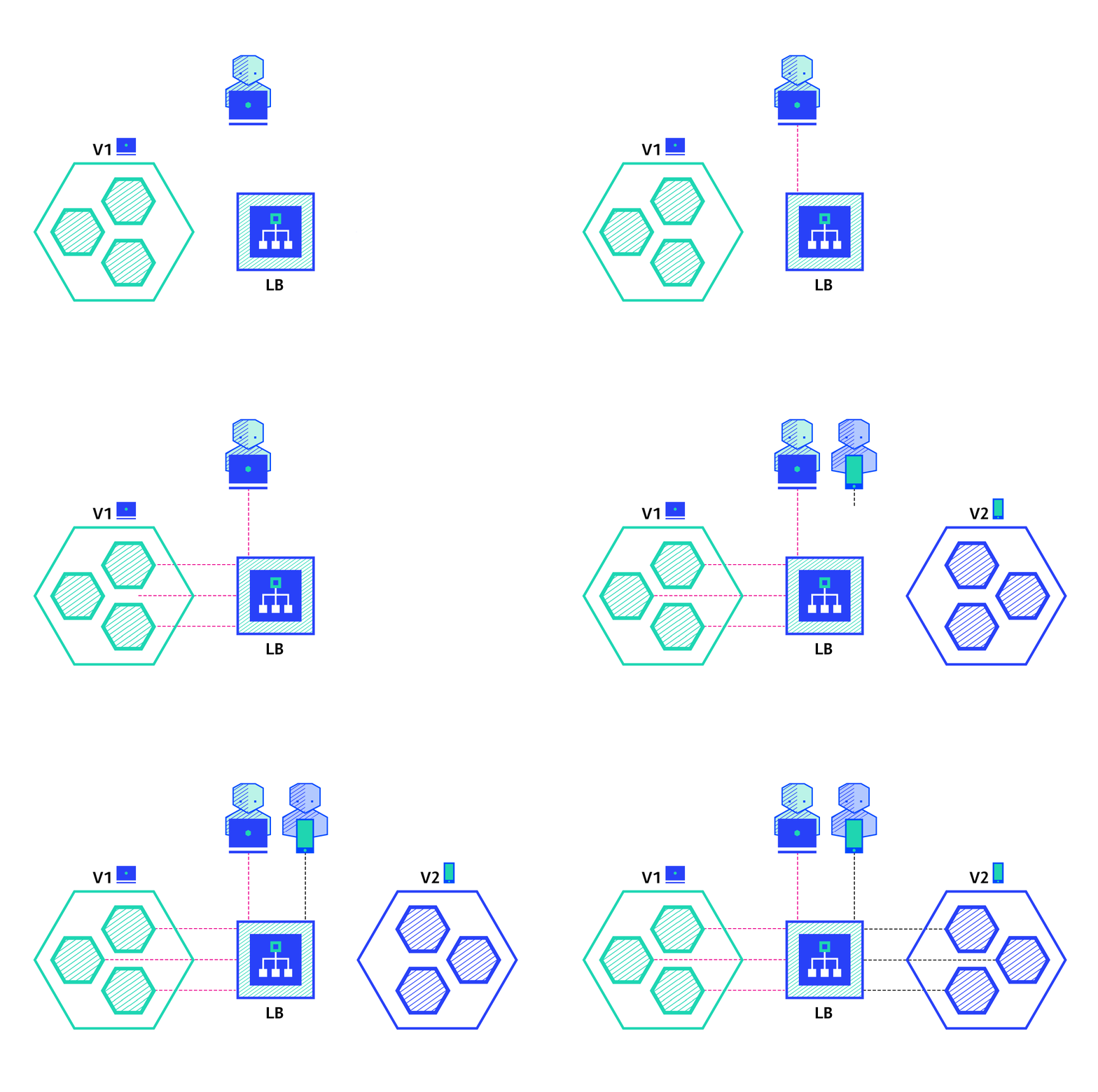
A/B 測試是指在特定條件下將一部分使用者路由到新功能上。
它通常用於根據統計來制定商業決策,而不是部署策略。
然而,他們是相關的,可以在金絲雀部署方式上新增額外功能來實現,所以我們這裏簡要介紹一下。
這個技術廣泛用於測試特定功能的切換,併發布使用佔大部分的版本。
下面是可以用於在版本間分散流量的條件:
- 瀏覽器 cookie
- 查詢引數
- 地理位置
- 技術支援:瀏覽器版本、螢幕尺寸、作業系統等
- 語言
優點:
- 多個版本並行執行
- 完全控制流量分佈
缺點:
- 需要智慧負載均衡
- 對於給定的會話,很難定位問題,分散式跟蹤是必須的
影子部署
影子部署是指在版本 A 旁邊釋出版本 B,
將版本 A 進來的請求同時分發到版本 B,
同時對生產環境流量無影響。
這是測試新特徵在產品負載上表現的很好用的方式。
當滿足上線要求後,則觸發釋出新應用。
這個技術配置非常複雜,而且需要特殊條件,尤其是分出請求。
例如一個購物車平臺,如果你想影子測試支付服務,
你可能最終會是使用者為他們的訂單支付兩次。
這種情況下,可以通過建立一個模擬的服務來重複響應使用者的請求。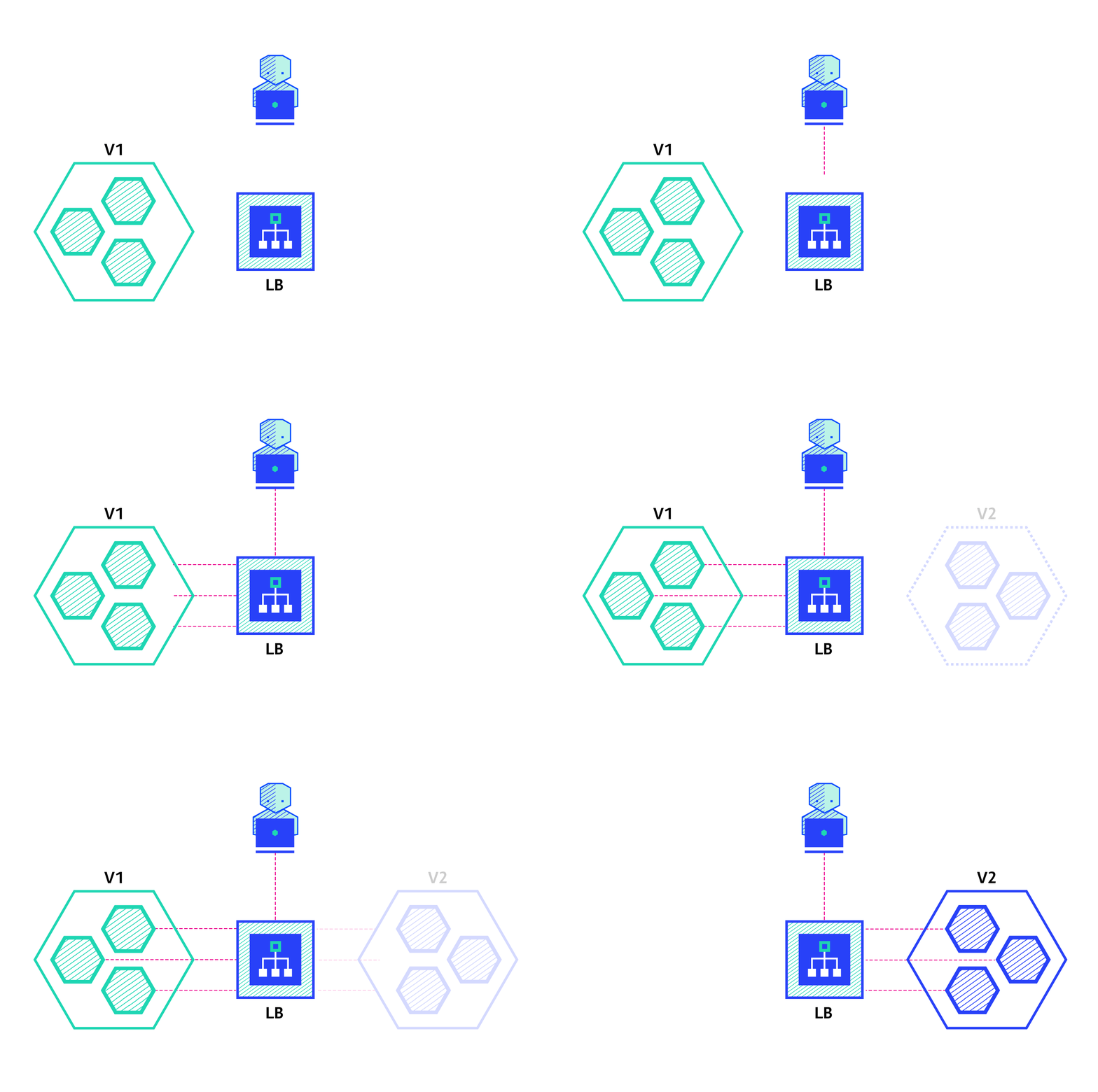
優點:
- 可以使用生產環境流量進行效能測試
- 對使用者無影響
- 直到應用的穩定性和效能滿足要求後才釋出
缺點:
- 雙倍資源,成本昂貴
- 不是真實使用者測試,可能出現誤導
- 配置複雜
- 某種情況下需要模擬服務
總結
部署應用有很多種方法,實際採用哪種方式取決於需求和預算。
當釋出到開發或者模擬環境時,重建或者滾動部署是一個好選擇。
當釋出到生產環境時,滾動部署或者藍綠部署通常是一個好選擇,
但是新平臺的主流程測試是必須的。
藍綠部署和影子部署對預算有更高的要求,因為需要雙倍資源。
如果應用缺乏測試或者對軟體的功能和穩定性影響缺乏信心,
那麼可以使用金絲雀部署或者 AB 測試或者影子釋出。
如果業務需要根據地理位置、語言、作業系統或者瀏覽器特徵等這樣引數來給一些特定的使用者測試,那麼可以採用 AB 測試技術。
最後但並不是最不重要的,影子釋出很複雜,且需要額外工作來模擬響應分支流量請求,
當可變操作(郵件、銀行等)呼叫外部依賴時這是必須的,
這個技術在升級新資料庫是非常有用,使用影子流量來監控負載下的系統性能。
下表可以幫助你選擇正確的策略: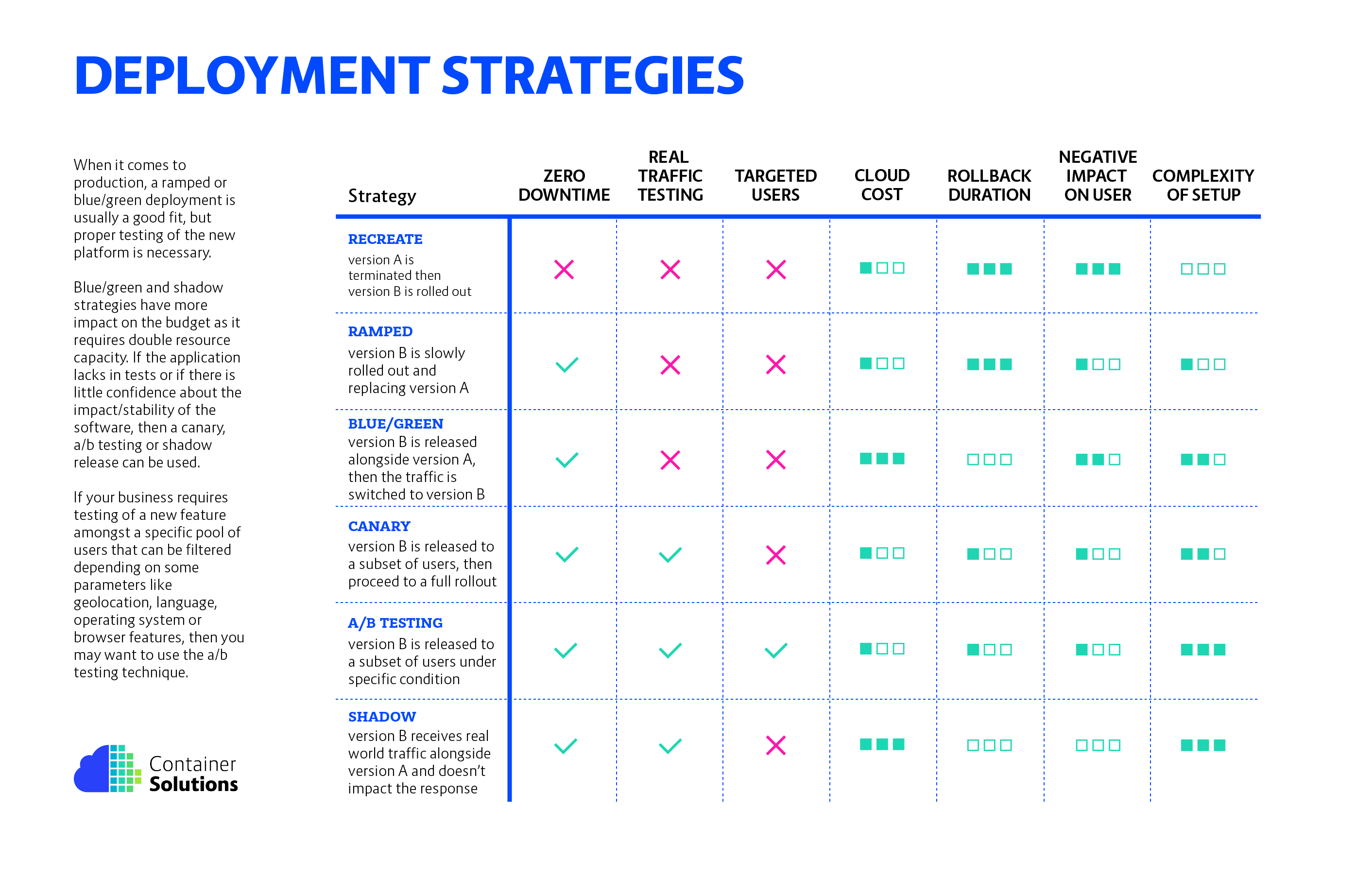
取決於雲服務提供商和平臺,如下文件是理解部署的很好開始:
- Amazon Web Services
- Docker Swarm
- Google Cloud
- Kubernetes
希望這是有幫助的,如果有任何問題或者反饋,可以在下面評論
(正文結束)
補充表格翻譯
| 策略 | 服務不斷線 | 真實環境測試 | 預算成本 | 退版時間 | 使用者影響 | 複雜度 |
| ———- | ———- | ———— | ——– | ——– | ———- | —— | — |
| 重建部署 | ✖ | ✖ | ✖ | ★☆☆ | ★★★ | ★★★ | ☆☆☆ |
| 滾動部署 | ✔ | ✖ | ✖ | ★☆☆ | ★★★ | ★☆☆ | ★☆☆ |
| 藍綠部署 | ✔ | ✖ | ✖ | ★★★ | ☆☆☆ | ★★☆ | ★★☆ |
| 金絲雀部署 | ✔ | ✔ | ✖ | ★☆☆ | ★☆☆ | ★☆☆ | ★★☆ |
| A/B 部署 | ✔ | ✔ | ✔ | ★☆☆ | ★☆☆ | ★☆☆ | ★★★ |
| 影子部署 | ✔ | ✔ | ✖ | ★★★ | ☆☆☆ | ☆☆☆ | ★★★ |
非常實用的文章,可惜中譯的圖片並非 gif,原文的超聯結也掉失,
特別重新修正以上問題,留作記錄
(fin)