[實作筆記] ASP.NET Worker Thread 與 IO Thread — DDoS 攻擊下的 ThreadPool 耗盡事故

前情提要

  1. 實務上的專案遭受 DDos 攻擊
  2. DB TimeOut
  3. Redis TimeOut
  4. 主程式沒有死,但是 Elmah 出現大量Exception

錯誤資訊

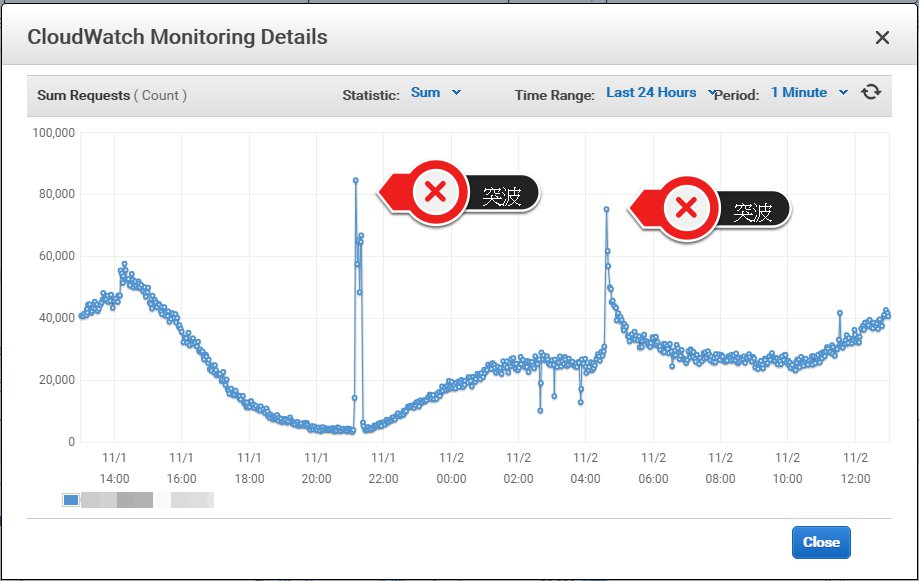
瞬發的流量

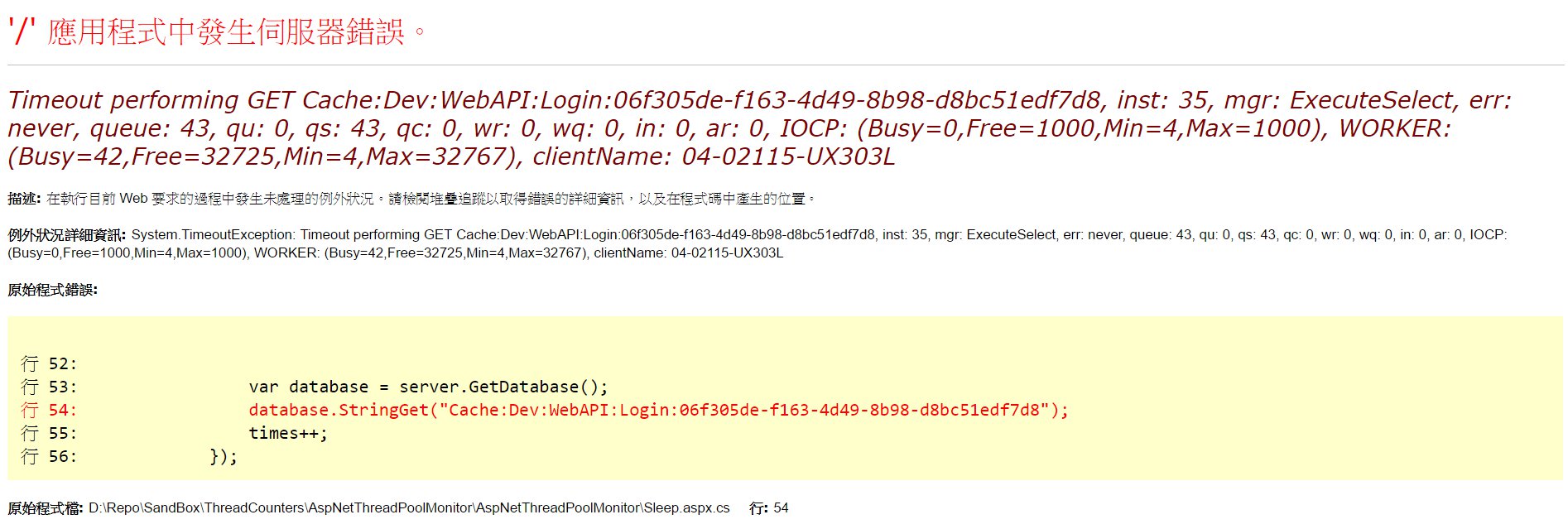
Redis的錯誤記錄

錯誤1.

1
2
3
4
Timeout performing SETEX Cache:Key:06f305de-f163-4d49-8b98-d8bc51edf7d8, 
inst: 1, mgr: ExecuteSelect, err: never, queue: 2, qu: 2, qs: 0, qc: 0, wr: 0, wq: 0, in: 0, ar: 0,
IOCP: (Busy=0,Free=1000,Min=4,Max=1000), WORKER: (Busy=165,Free=32602,Min=4,Max=32767),
clientName: TYO-HOST

錯誤2.

1
2
StackExchange.Redis.RedisConnectionException
SocketFailure on GET

錯誤3.

1
2
No connection is available to service this operation: 
GET Cache:Key:06f305de-f163-4d49-8b98-d8bc51edf7d8

錯誤4.

1
UnableToResolvePhysicalConnection on GET

SQL Server 錯誤記錄

1
2
A transport-level error has occurred when receiving results from the server. 
(provider: Session Provider, error: 19 - Physical connection is not usable)

錯誤原因

  1. CLR 建立執行緒需要時間 , 一秒鐘最多只能建立兩條 Thread 註一
  2. 瞬間的 Request 量超過 ThreadPool 中的 Thread 數量
  3. ThreadPool 建立 Thread 中 , 仍持續有 Request 進來引發錯誤
  4. 因為我的測試環境有四核心,依文件所說

實驗流程

  1. 建立監視器
    參考 How To: Monitor the ASP.NET Thread Pool Using Custom Counters

    1. 建立一個 console 專案, MyAspNetThreadCounters
    2. 編譯並執行 console 專案
    3. 開啟Regedit.exe 檢查 HKEY_LOCAL_MACHINE\SYSTEM\CurrentControlSet\Services 應包含以下值
    1
    2
    3
    4
    5
    6
    Available Worker Threads
    Available IO Threads
    Max Worker Threads
    Max IO Threads
    Min Worker Threads
    Min IO Threads
  2. 建立ASP.NET專案

    1. 建立Global.asax
    2. 建立StartWebApp.aspx
    3. 建立Sleep.aspx
  3. 開啟 perfmon.exe 新增計數器 , 選取我們自定義的 MyAspNetThreadCounters

  4. 連結網頁 localhost\StartWebApp.aspx 以啟動網站,可以得到以下數據

    1
    2
    3
    4
    5
    6
    MaxWorkerThreads:32767.
    MaxIOThreads:1000.
    MinWorkerThreads:4.
    MinIOThreads:4.
    AvailableWorker:32766.
    AvailableIO:1000.
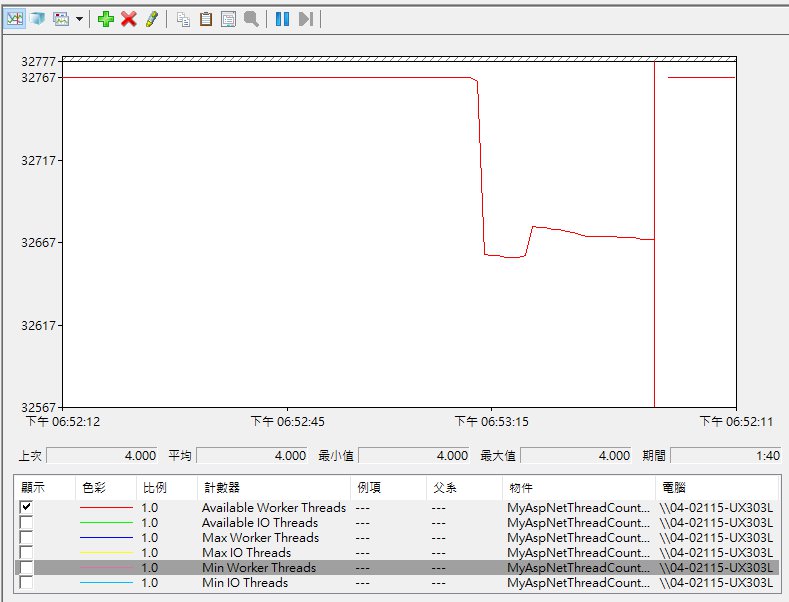
  5. 執行大量 redis 連線,觀察結果 AvailableWorker Threads 會往下掉,
    故推斷 redis connection 是透過 Worker Threads 建立.

  6. 重現錯誤, 執行大量的 sleep 頁面,透過這種方式搶佔IIS的執行緒.

  7. 再執行大量 redis 連線, 用以重現錯誤

程式碼

MyAspNetThreadCounters

1
2
3
4
5
6
7
8
9
10
11
12
13
14
15
16
17
18
19
20
21
22
23
24
25
26
27
28
29
30
31
32
33
34
35
36
37
38
39
40
41
42
43
44
45
46
47
48
49
50
51
52
53
54
55
56
57
58
59
60
61
62
63
64
65
66
67
68
69
70
71
72
73
74
75
76
77
78
79
80
81
82
83
84
using System;
using System.Diagnostics;

class MyAspNetThreadCounters
{
[STAThread]
static void Main(string[] args)
{
CreateCounters();
Console.WriteLine("MyAspNetThreadCounters performance counter category " +
"is created. [Press Enter]");
Console.ReadLine();
}

public static void CreateCounters()
{
CounterCreationDataCollection col =
new CounterCreationDataCollection();

// Create custom counter objects
CounterCreationData counter1 = new CounterCreationData();
counter1.CounterName = "Available Worker Threads";
counter1.CounterHelp = "The difference between the maximum number " +
"of thread pool worker threads and the " +
"number currently active.";
counter1.CounterType = PerformanceCounterType.NumberOfItems32;

CounterCreationData counter2 = new CounterCreationData();
counter2.CounterName = "Available IO Threads";
counter2.CounterHelp = "The difference between the maximum number of " +
"thread pool IO threads and the number " +
"currently active.";
counter2.CounterType = PerformanceCounterType.NumberOfItems32;

CounterCreationData counter3 = new CounterCreationData();
counter3.CounterName = "Max Worker Threads";
counter3.CounterHelp = "The number of requests to the thread pool " +
"that can be active concurrently. All " +
"requests above that number remain queued until " +
"thread pool worker threads become available.";
counter3.CounterType = PerformanceCounterType.NumberOfItems32;

CounterCreationData counter4 = new CounterCreationData();
counter4.CounterName = "Max IO Threads";
counter4.CounterHelp = "The number of requests to the thread pool " +
"that can be active concurrently. All " +
"requests above that number remain queued until " +
"thread pool IO threads become available.";
counter4.CounterType = PerformanceCounterType.NumberOfItems32;

CounterCreationData counter5 = new CounterCreationData();
counter5.CounterName = "Min Worker Threads";
counter5.CounterHelp = "The number of requests to the thread pool " +
"that can be active concurrently. All " +
"requests above that number remain queued until " +
"thread pool worker threads become available.";
counter5.CounterType = PerformanceCounterType.NumberOfItems32;

CounterCreationData counter6 = new CounterCreationData();
counter6.CounterName = "Min IO Threads";
counter6.CounterHelp = "The number of requests to the thread pool " +
"that can be active concurrently. All " +
"requests above that number remain queued until " +
"thread pool IO threads become available.";
counter6.CounterType = PerformanceCounterType.NumberOfItems32;

// Add custom counter objects to CounterCreationDataCollection.
col.Add(counter1);
col.Add(counter2);
col.Add(counter3);
col.Add(counter4);
col.Add(counter5);
col.Add(counter6);

// delete the category if it already exists
if (PerformanceCounterCategory.Exists("MyAspNetThreadCounters"))
{
PerformanceCounterCategory.Delete("MyAspNetThreadCounters");
}
// bind the counters to the PerformanceCounterCategory
PerformanceCounterCategory category =
PerformanceCounterCategory.Create("MyAspNetThreadCounters","", col);
}
}

Global.asax

1
2
3
4
5
6
7
8
9
10
11
12
13
14
15
16
17
18
19
20
21
public class Global : System.Web
{
//BusyThreads = TP.GetMaxThreads() –TP.GetAVailable();
//If BusyThreads >= TP.GetMinThreads(), then threadpool growth throttling is possible.

int maxIoThreads, maxWorkerThreads;
ThreadPool.GetMaxThreads(out maxWorkerThreads, out maxIoThreads);

int freeIoThreads, freeWorkerThreads;
ThreadPool.GetAvailableThreads(out freeWorkerThreads, out freeIoThreads);

int minIoThreads, minWorkerThreads;
ThreadPool.GetMinThreads(out minWorkerThreads, out minIoThreads);

int busyIoThreads = maxIoThreads - freeIoThreads;
int busyWorkerThreads = maxWorkerThreads - freeWorkerThreads;

iocp = $"(Busy={busyIoThreads},Free={freeIoThreads},Min={minIoThreads},Max={maxIoThreads})";
worker = $"(Busy={busyWorkerThreads},Free={freeWorkerThreads},Min={minWorkerThreads},Max={maxWorkerThreads})";
return busyWorkerThreads;
}
1
2
3
4
5
6
7
8
9
10
11
12
13
14
15
16
17
18
19
20
21
22
23
24
25
26
27
28
29
30
31
32
33
34
35
36
37
38
39
40
41
42
43
44
45
46
47
48
49
50
51
52
53
54
55
56
57
58
59
60
61
62
63
64
65
66
67
68
69
70
71
72
73
74
75
76
77
78
79
80
81
82
83
84
85
86
87
88
89
90
91
92
93
94
95
96
97
98
99
100
101
102
103
104
105
106
107
108
109
110
111
112
113
114
115
116
117
118
119
120
121
122
123
124
125
126
127
128
129
130
131
132
133
134
135
136
137
138
139
140
141
142
143
144
145
146
using System;

public class Global : System.Web.HttpApplication
{
public bool MonitorThreadPoolEnabled = true;
protected void Application_Start(object sender, EventArgs e)
{
Thread t = new Thread(new ThreadStart(RefreshCounters));
t.Start();
}

protected void Session_Start(object sender, EventArgs e)
{

}

protected void Application_BeginRequest(object sender, EventArgs e)
{

}

protected void Application_AuthenticateRequest(object sender, EventArgs e)
{

}

protected void Application_Error(object sender, EventArgs e)
{

}

protected void Session_End(object sender, EventArgs e)
{

}

protected void Application_End(object sender, EventArgs e)
{
MonitorThreadPoolEnabled = false;
}

public void RefreshCounters()
{
while (MonitorThreadPoolEnabled)
{
ASPNETThreadInfo t = GetThreadInfo();
ShowPerfCounters(t);
System.Threading.Thread.Sleep(500);
}
}

public struct ASPNETThreadInfo
{
public int MaxWorkerThreads;
public int MaxIOThreads;
public int MinFreeThreads;
public int MinLocalRequestFreeThreads;
public int AvailableWorkerThreads;
public int AvailableIOThreads;

public bool Equals(ASPNETThreadInfo other)
{
return (
MaxWorkerThreads == other.MaxWorkerThreads &&
MaxIOThreads == other.MaxIOThreads &&
MinFreeThreads == other.MinFreeThreads &&
MinLocalRequestFreeThreads == other.MinLocalRequestFreeThreads &&
AvailableWorkerThreads == other.AvailableWorkerThreads &&
AvailableIOThreads == other.AvailableIOThreads
);
}
}

public ASPNETThreadInfo GetThreadInfo()
{
// use ThreadPool to get the current status
int availableWorker, availableIO;
int maxWorker, maxIO;

ThreadPool.GetAvailableThreads(out availableWorker, out availableIO);
ThreadPool.GetMaxThreads(out maxWorker, out maxIO);
ASPNETThreadInfo threadInfo;
threadInfo.AvailableWorkerThreads = (Int16)availableWorker;
threadInfo.AvailableIOThreads = (Int16)availableIO;
threadInfo.MaxWorkerThreads = (Int16)maxWorker;
threadInfo.MaxIOThreads = (Int16)maxIO;
// hard code for now; could get this from machine.config
threadInfo.MinFreeThreads = 8;
threadInfo.MinLocalRequestFreeThreads = 4;
return threadInfo;
}

public void ShowPerfCounters(ASPNETThreadInfo t)
{

// get an instance of our Available Worker Threads counter
PerformanceCounter counter1 = new PerformanceCounter();
counter1.CategoryName = "MyAspNetThreadCounters";
counter1.CounterName = "Available Worker Threads";
counter1.ReadOnly = false;

// set the value of the counter
counter1.RawValue = t.AvailableWorkerThreads;
counter1.Close();

// repeat for other counters

PerformanceCounter counter2 = new PerformanceCounter();
counter2.CategoryName = "MyAspNetThreadCounters";
counter2.CounterName = "Available IO Threads";
counter2.ReadOnly = false;
counter2.RawValue = t.AvailableIOThreads;
counter2.Close();

PerformanceCounter counter3 = new PerformanceCounter();
counter3.CategoryName = "MyAspNetThreadCounters";
counter3.CounterName = "Max Worker Threads";
counter3.ReadOnly = false;
counter3.RawValue = t.MaxWorkerThreads;
counter3.Close();

PerformanceCounter counter4 = new PerformanceCounter();
counter4.CategoryName = "MyAspNetThreadCounters";
counter4.CounterName = "Max IO Threads";
counter4.ReadOnly = false;
counter4.RawValue = t.MaxIOThreads;
counter4.Close();

int minWorker, minIO;
ThreadPool.GetMinThreads(out minWorker, out minIO);

PerformanceCounter counter5 = new PerformanceCounter();
counter5.CategoryName = "MyAspNetThreadCounters";
counter5.CounterName = "Min Worker Threads";
counter5.ReadOnly = false;
counter5.RawValue = minWorker;
counter5.Close();

PerformanceCounter counter6 = new PerformanceCounter();
counter6.CategoryName = "MyAspNetThreadCounters";
counter6.CounterName = "Min IO Threads";
counter6.ReadOnly = false;
counter6.RawValue = minIO;
counter6.Close();
}
}

StartWebApp.aspx

1
2
3
4
5
6
7
8
9
10
11
12
13
14
15
16
17
18
19
protected void Page_Load(object sender, EventArgs e)
{
int availableWorker, availableIO;
int maxWorker, maxIO;
int minWorker, minIO;

ThreadPool.GetAvailableThreads(out availableWorker, out availableIO);
ThreadPool.GetMaxThreads(out maxWorker, out maxIO);
ThreadPool.GetMinThreads(out minWorker, out minIO);

Response.Write("This ASP.NET application has started.<br>");
Response.Write(string.Format("MaxWorkerThreads:{0}.<br>", maxWorker));
Response.Write(string.Format("MaxIOThreads:{0}.<br>", maxIO));
Response.Write(string.Format("MinWorkerThreads:{0}.<br>", minWorker));
Response.Write(string.Format("MinIOThreads:{0}.<br>", minIO));
Response.Write(string.Format("AvailableWorker:{0}.<br>", availableWorker));
Response.Write(string.Format("AvailableIO:{0}.<br>", availableIO));
Response.Write("You can now close this page.");
}

Sleep.aspx

1
2
3
4
5
6
7
8
9
10
11
12
13
14
15
16
17
18
19
20
21
void Page_Load(Object sender, EventArgs e)
{
int times = 0 ;
var max = int.Parse(Request.QueryString.Get("max"));
var server = ConnectionMultiplexer.Connect("redisserver:6379,ssl=false,password=,allowAdmin=false,connectTimeout=200");
var list = Enumerable.Range(1, max).ToList();
Parallel.ForEach(list, (i) =>
{

var database = server.GetDatabase();
database.StringGet("Cache:Key:06f305de-f163-4d49-8b98-d8bc51edf7d8");
times++;
});

int availableWorker, availableIO;
int maxWorker, maxIO;
ThreadPool.SetMaxThreads(1, 1);
ThreadPool.GetAvailableThreads(out availableWorker, out availableIO);
ThreadPool.GetMaxThreads(out maxWorker, out maxIO);
Response.Write(String.Format("Connect Redis Busy:{0}<br /> {1}",maxWorker - availableWorker, times));
}

StackExchange.Redis 源碼

1
2
3
4
5
6
7
8
9
10
11
12
13
14
15
16
17
18
19
20
21
private static int GetThreadPoolStats(out string iocp, out string worker)
{
//BusyThreads = TP.GetMaxThreads() –TP.GetAVailable();
//If BusyThreads >= TP.GetMinThreads(), then threadpool growth throttling is possible.

int maxIoThreads, maxWorkerThreads;
ThreadPool.GetMaxThreads(out maxWorkerThreads, out maxIoThreads);

int freeIoThreads, freeWorkerThreads;
ThreadPool.GetAvailableThreads(out freeWorkerThreads, out freeIoThreads);

int minIoThreads, minWorkerThreads;
ThreadPool.GetMinThreads(out minWorkerThreads, out minIoThreads);

int busyIoThreads = maxIoThreads - freeIoThreads;
int busyWorkerThreads = maxWorkerThreads - freeWorkerThreads;

iocp = $"(Busy={busyIoThreads},Free={freeIoThreads},Min={minIoThreads},Max={maxIoThreads})";
worker = $"(Busy={busyWorkerThreads},Free={freeWorkerThreads},Min={minWorkerThreads},Max={maxWorkerThreads})";
return busyWorkerThreads;
}

環境與工具

  • Visual Studio 2015 Professional UPDATE 3
  • Windows 10
  • .NET Framework 4.5
  • StackExchange.Redis 1.0.481
  • CPU Intel® Core™ i7-5500U 四核心

官方說明

1
2
3
4
<system.web>
<processModel autoConfig="false" maxWorkerThreads="xxx" maxIoThreads="xxx" minWorkerThreads="xxx" minIoThreads="xxx" requestQueueLimit="5000" responseDeadlockInterval="00:03:00"/>
<httpRuntime minFreeThreads="xxx" minLocalRequestFreeThreads="xxx"/>
</system.web>

建議的設定值

1
2
3
<system.web>
<processModel autoConfig="false" minWorkerThreads="1" />
</system.web>

.NET 官方文件的預設值與建議值

名稱 預設值 建議配置
maxWorkerThreads 20 32767 / #Cores
maxIoThreads 20 32767 / #Cores
minWorkerThreads 1 maxWorkerThreads/2
minIoThreads 1 maxIoThreads / 2
minFreeThreads 8 88*#CPUs
minLocalRequestFreeThreads 4 76*#CPUs
maxconnection 2 12*CPUs
executionTimeout 90s 未建議
  • maxWorkerThreads,minWorkerThreads,maxIoThreads,minIoThreads 設定的數值需要乘上CPU的數量,

例: 4 核心設定 minWorkerThreads 值 20 ,實際上的值為 80

註釋

  1. ThreadPool 中會有一個 queue , 其中隱含一個半秒機制 , 當 queue 靜止超過半秒 , 就會在 ThreadPool 建立一個新的 Thread

記錄

  • ADO.NET 需要使用 Worker Thread
  • Redis 需要使用 Worker Thread

參考

(fin)

Please enable JavaScript to view the Gitalk. :D
Please enable JavaScript to view the LikeCoin. :P